
How can we help?
For most requests, the Support Portal is the fastest way to reach us. Give us a clear description of the issue and include any error messages you see.
Start Here
Support Portal
Submit a new ticket, check on an open one and see your past requests.
- Sign in with your work email address.
- Select New Ticket and describe what is happening.
- Include the affected person or computer, any error text, and a screenshot when you can.
Other ways to reach us
Use the System Tray
Create a ticket directly from your managed PC.
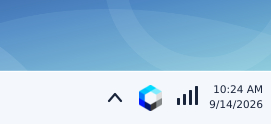
- Look near the clock at the bottom-right of your screen.
- Click the up arrow if the Hermetic icon is hidden.
- Click the icon, choose Submit a Ticket, add details, and click Send Request.
Share Your Screen
Connect when a technician is ready to help.
- Click the button and download the temporary support app.
- Open the downloaded file and approve the connection prompt.
- Keep the window open while you work with your technician.
Email or Call
Reach the help desk without the portal.
Email the ticket system
Start a new ticket from your work email. Use a specific subject line and include screenshots.
Call the office
For an existing ticket, have the ticket number ready. For a new issue, we will create a ticket for you.
Emergencies and after-hours
Our office hours are Monday through Friday, 9am to 5pm. If something urgent comes up, call us. Emergency and after-hours charges may apply.